November 13, 2025
Passing form groups to child components
I’ve always been sure that when it comes to using Reactive Forms I know how to set these up, after all I’ve created more than I can remember, and most of…

I’ve always been sure that when it comes to using Reactive Forms I know how to set these up, after all I’ve created more than I can remember, and most of the time this is straight forward.
Start by creating a FormGroup, add some fields that will be used to hold our data, add some validation, create a submit method for saving the data. Next, add a form element to the HTML give it the formGroup name we created earlier, add a formControlName to each control, pointing to the appropriate field in the formGroup and finally, add the validation to each control and job done.
I might be over simplifying this process a bit, but you get the general idea.
This gets a little more complex when child components are used that also need to be part of the parent formGroup, which makes sense.
Turns out, this is part that I had issues with.
For this, I would follow the above process, but on the child component, add an input on the child component that accepts the formGroup name from the parent and use that name for my child formGroup.
I would usually then create an output to return the values from the child component to the parent, this didn’t register with me that I probably didn’t need to do this. That’s a rough outline of how I would have approached form creation with child components and didn’t really think too much about whether what I was doing was ideal, after all, it worked, what’s the problem?
Until it doesn’t work, or you struggle to make sense of it weeks/months later and you just end up fighting with it. So what’s the answer? To be fair, I wasn’t that far away I had just missed a few points, which is annoying to be this close and not realise it.
Let’s look at the parent component first.
import { JsonPipe } from '@angular/common';
import { ChangeDetectionStrategy, Component, inject } from '@angular/core';
import { FormBuilder, ReactiveFormsModule } from '@angular/forms';
import { MatFormField, MatInput, MatLabel } from '@angular/material/input';
import { Child } from '../../ui/child/child';

@Component({
  selector: 'parent',
  imports: [ReactiveFormsModule, MatInput,
            MatLabel, MatFormField, Child, JsonPipe
           ],
  templateUrl: './parent.html',
  styleUrl: './parent.scss',
  changeDetection: ChangeDetectionStrategy.OnPush,
})
export class Parent {
  private formBuilder = inject(FormBuilder);
  protected parentForm = this.formBuilder.group({
    name: [''],
    description: [''],
    addressType: this.formBuilder.group({
      value: [null],
    }),
  });
}
The parent component contains all the fields we need to display our data, you’ll notice, that the addressType is in its own formGroup within the parent, which I didn’t do before, our child component will be handling the addressType for us.
<div>
  <form [formGroup]="parentForm">
    <mat-form-field appearance="outline">
      <mat-label>Name</mat-label>
      <input type="text" placeholder="Name"
             matInput formControlName="name" />
    </mat-form-field>
    <mat-form-field appearance="outline">
      <mat-label>Description</mat-label>
      <input type="text" placeholder="Description"
             matInput formControlName="description" />
    </mat-form-field>
    <child formGroupName="addressType" />
  </form>
</div>

<pre>{{ parentForm.value | json }}</pre>
In the HTML for our parent component we have a form, our name and description inputs and our custom component, we pass in the formGroup “addressType” to the child component and not the parent formGroup, this is the second mistake I made.
This is where I had been going wrong in the past and was not making this a separate formGroup and was passing in the parentForm group instead.
On the child component we’ll create an input called formGroupName, and inject the formGroupDirective (this is key to this working) we can use this directive to bind our parent formGroup (addressType) to the child component formGroup.
import { ChangeDetectionStrategy,
         Component, inject, input } from '@angular/core';
import { FormGroup, FormGroupDirective,
         ReactiveFormsModule } from '@angular/forms';
import { MatFormField, MatInputModule,
         MatLabel } from '@angular/material/input';
import { MatSelectModule } from '@angular/material/select';

export type SelectType = {
  value: string;
  viewValue: string;
};

@Component({
  selector: 'child',
  imports: [ReactiveFormsModule, MatFormField,
            MatLabel, MatInputModule, MatSelectModule
           ],
  templateUrl: './child.html',
  styleUrl: './child.scss',
  changeDetection: ChangeDetectionStrategy.OnPush,
})
export class Child {
  readonly formGroupName = input<string>('');
  childForm!: FormGroup;
  rootFormGroup = inject(FormGroupDirective);

  // get list of addressTypes
  addressTypes: SelectType[] = [
    { value: '0', viewValue: 'Primary' },
    { value: '1', viewValue: 'Billing' },
    { value: '2', viewValue: 'Shipping' },
  ];

  ngOnInit(): void {
    this.childForm =
      this.rootFormGroup.control.get(this.formGroupName()) as FormGroup;
  }
}
In the ngOnInit life cycle hook, we set our childForm, using the formGroupDirective (rootFormGroup) to the formGroup we passed in from the parent (addressType). Using the FormGroupDirective binds the formGroup to a DOM element, we are taking our parent formGroup and binding it to the child formGroup, and makes all child controls accessible.
<div>
  <form [formGroup]="childForm">
    <mat-form-field appearance="outline">
      <mat-label>Address Type</mat-label>
      <mat-select formControlName="value">
        @for (address of addressTypes; track address.value) {
        <mat-option [value]="address.value">
          {{ address.viewValue }}</mat-option>
        }
      </mat-select>
    </mat-form-field>
  </form>
</div>
In the child components HTML we create a form element and add our drop down control (I’m using Angular Material in this example, but it would be the same for native controls).
And because this is now part of the form group in the parent, when we select a value from the drop down the value automatically appears, no need to set up outputs to pass data back to parents, it just works!
{
 "name": "",
 "description": null,
 "addressType": {
   "value": null
  },
}
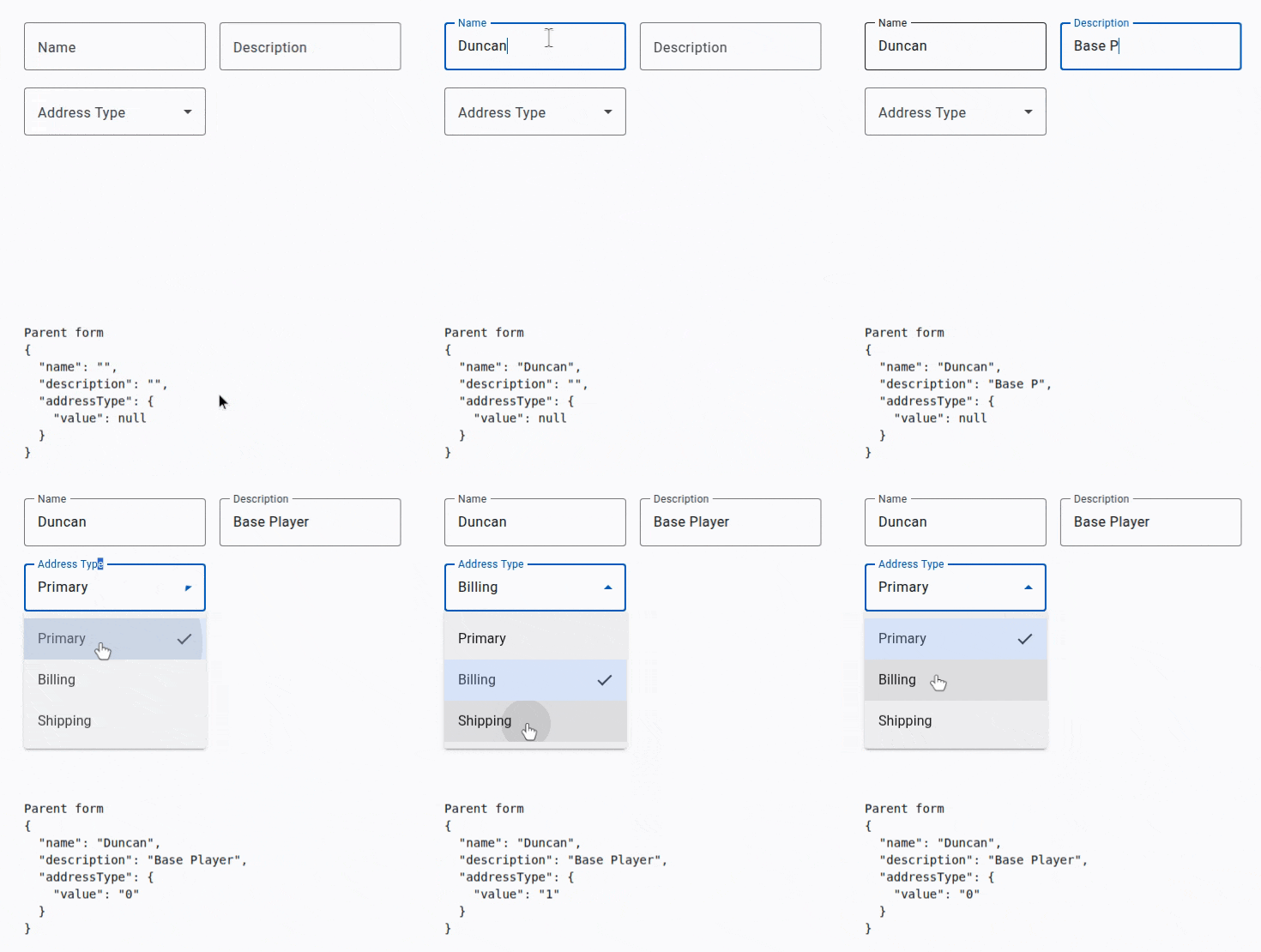
As we can see in the below screen grab, selecting an item from the drop down (addressType) we can see that this gets the ID from the child component and is returned to the parent.
Let’s extend this to include a postcode field, that’s a text input, just to show how easy it is to extend and add another control.
export class Parent {
  private formBuilder = inject(FormBuilder);
  protected parentForm = this.formBuilder.group({
    name: [''],
    description: [''],
    addressType: this.formBuilder.group({
      value: [null],
      postcode: [''],
    }),
  });
}
In the parent form under the addressType formGroup add the postcode field. In the child component add an input to enter a postcode value.
 <mat-form-field appearance="outline">
      <mat-label>Postcode</mat-label>
      <input type="text" formControlName="postcode"
             matInput placeholder="postcode" />
 </mat-form-field>
Add this below the mat-form-field closing tag, and in the Typescript file import the MatInputModule if you have’t already done so. And that’s all we need to do, the postcode will come through automatically.
Parent form
{
  "name": "John Doe",
  "description": "developer",
  "addressType": {
    "value": "2",
    "postcode": "AB12 OBX"
  }
}
Here’s a link to the GitHub repo for the project. https://github.com/DuncanFaulkner/parent-child-form
I hope you have found this post to be useful and informative.
Want to learn Angular? My book on getting started is available at:
Amazon: Modern-Web-Development-Angular
OrangeAVA: Modern-Web-Development-Angular — Currently 30% off
Originally published on Medium.